
What could be the best way to introduce the world of computers to a kid, let’s say of 6 years old, so that he learns to handle it like a toy and stops dreading it like some esoteric, arcane and recondite machine from some eldritch, enigmatic, cryptic and phantasmal world ?
Maybe my https://fabien.benetou.fr/Content/BuildingAComputer could help.
I also answered your question in https://lemmy.ml/post/38363131/21987482 but it’s intertwined.
I wouldn’t “teach” them what a computer is, I would co-explore with them instead.
Install something like edubuntu/endless os with gcompiz
Minecraft (Java) with Mods
6 years old is a bit young because sat that age they need a reason to engage with anything.
Games might be a place to start, but a kid will think “tablet is easier”. Same with music or videos.
Art is another place to start, but even then, why computers?
You need to wait until they have an idea or goal they want to accomplish, then maybe use it as an illustrative tool. In most cases for kids though, a PC is unnecessary with phones and tablets being so prevalent with an easier to grasp UI/UX.
I mean I installed commodore os vision recently and I was like " I would have lost my mind if id had this at 6, there is so much you can do, with no internet!!" I got into computers at 5, and had no internet until probably 15 ish.
So id give a kid a pc with commodore os on it. It comes pre-installed with programming apps and games and drawing programs for kids too. Its awesome.
You aren’t your children though. They experience better technology literally all the time.
Sure but “better” is subjective. Newer, sure. A ps5 game isnt inherently more fun than an n64 game. Im not a fan of new=good.
Also, it should be noted phones and tablets purely exist to consume, consume, consume. They’re not for creation; a computer is.
I think any kid interested in learning would find all aspects of computing cool, not just an ipad. Just like how I can have fun on a 2600, and also my gaming pc. Its all interesting and fun. I think kids just aren’t exposed to anything other than the shiny new ad filled dlc ridden consoles that get pushed now. There’s so much out there especially if you get into custom handhelds or ras pi etc.
It is very much subjective. Are you serious?
If you grew up with keyboards and mice, that has all been removed as a barrier to interaction with computers.
You’re insane if you think your old way of doing things is somehow “better” or meaningful.
I bet you’re also trying to force your kids to listen to YOUR music and tell them why it’s better then their choices, right??
Grow up.
@just_another_person@lemmy.world but l would be working with a desktop where the CPU is located inside the cabinet.
@bridgeenjoyer@sh.itjust.works
@just_another_person@lemmy.world l live in a country where bullock carts are still a means of transport 😄😄😄😄😄
@bridgeenjoyer@sh.itjust.works
Newer absolutely does not mean better.
This is why we are seeing a return to old household items. People are realizing that Teflon and cartridge razors and Tupperware aren’t really as great as we thought they were. We just grew up familiar with them because that’s what everyone used, so they must be better, right?
This is all because boomers and the “greatest generation” were really easy to market to when TVs came into homes. People weren’t ready for that level of advertisement.
I don’t think we’ll see a return to punch cards, but I don’t see keyboard/mouse ever going away.
Literally nothing I said in my comment is related to anything you e said here.
I don’t get where this is coming from.
My point is, you seem to think that the new way is better, with everything touchscreen. Just because it’s new doesn’t mean it’s better. People thought Teflon and cartridge razors were better too. Turns out they were just brainwashed.
I’m saying KIDS do. Especially younger kids. Clearly started in my original comment.
Kids think whatever they’re exposed to.
Neither of my kids use their tablets anymore after having/getting access to a laptop. They were a little confused, at first, since the town uses touchscreen Chromebooks for K-1, but they got used to it, since none of my laptops have a touchscreen. Now they view touchscreens as being for babies. Like that kid in BTTF2 with the lightgun…“You mean you have to use your hands?”
Wow.
Don’t hurt yourself there, Groucho.
LOL
@bridgeenjoyer@sh.itjust.works l’m thinking of doing it on MX Linux with evilwm as the de. I shall be starting with games from the 80s and the 90s, which can be played on dosbox x.
@just_another_person@lemmy.world
Games might be a place to start, but a kid will think “tablet is easier”.
If you play RTS games it’s really hard to do it without mouse and keyboard, so that’s a point for a desktop or laptop
A 6 year old child though…
I played computer games since I was like 5 years old, it’s not so hard to figure out when you just get to play a few hours a day. I figured stuff out by myself even though I didn’t even speak English and everything was in English
@iopq@lemmy.world you mean games that can be played on dosbox x ??
@just_another_person@lemmy.world
That’s why I think this is such a good question. How can we incorporate (linux) computers more in the digital literacy of children so they don’t fall victim to the golden cages of android and ios before they develop the maturity to understand what a handicap it is.
@ISOmorph@feddit.org maybe by playing games of the 80s and the 90s ??🤔🤔🤔
@just_another_person@lemmy.world
Linux is literally in every device in your home. Doesn’t mean you’re kids need to engage with it.
@just_another_person@lemmy.world have you ever tried the games on abandonware ??🤔🤔🤔
Old computer no wifi, as a kid I just explored the computer menus and played the few offline games, drew in paint, by like 10 I had swapped to adobe flash off some piraxy yt videos, maybe load it up with software that could be fun for kids to use
Scratch is a good one, might be too young, but learn to think like a coder while playing around
This plus a Lego mindstorm.
I got mine a comic book which introduces making simple games in mit scratch. The kid loved the comic, read it multiple times. We sat together and entered the game, had a lot of fun changing the characters, and never did that again (I’m not pushing). The computer is still a boring thing dad does for work.
It doesn’t help that I can’t explain what I’m doing on my computer on the few times the kid bothers to ask. I’m writing a program that transforms this wall of text into that spreadsheet 🥱
Care to name the comic? My kid likes going onto scratch and checking out other people’s stuff, and made a few little animations himself…but the whole thing is a bit overwhelming at first.
https://edukomiks.pl/ not sure if it’s translated to other languages
@RheumatoidArthritis@mander.xyz Polish ???
@JasonDJ@lemmy.zip
I installed gcompris for my 5 year old. FOSS childrens educational software and games from KDE.
I also bought her a cheap, pink, 65% keyboard and mouse set that make it “her computer”.
There’s also a few free resources to teach typing once your kid can read and write enough to understand what they’re typing. I’ve heard good things about Typing.com and typingclub.com but we’re not ready to start typing yet so I haven’t used them.
Also, if my kids ask a question that’s a little tricky to explain I’ll show them how I use a computer (or phone) to look for answers. One of the few practical applications I’ve ever found for AI is “can you explain [abstract concept] in a way that a 5 year old can understand”. This isn’t explicitly teaching computer skills, but showing them a practical use case and how to dig into their curiosity.
The BBC Microbit was designed for exactly this scenario: https://microbit.org/
If you want them to have a more desktop-like environment, the Raspberry Pi has kid-specific projects: https://www.raspberrypi.org/learn/
Or you can get a Pi Kano kit and it has everything you need: https://www.kano.me/
Well I got my first PC when I was 5 (2005), and I just learnt to use the PC by myself (because my parents didn’t understand it) over several years.
When I will eventually have a child, these would be my steps to encourage them to use a PC:
- Tell them that they can play paid games for free and show them how to do it
- Give general internet usage tips
- Convince them that a PC worths way more than a console, because you can play way more games on it, and you can also do a bunch more things with it
I don’t think a 5 year old will understand a PC’s usefullnes for sure, but their receptors will definitely be turned on after hearing FREE GAMES.
@PrivateNoob@sopuli.xyz l would be working on a PC of the 80s😄😄😄
An 80s PC for a child in 2025? That’s mad. I hope it will work out well then!
@PrivateNoob@sopuli.xyz there are laptops, but I organisation l work with is traditional and old fashioned.
When we got our first computer it was a Win 95 machine, with a copy of Encarta, Atlas. I don’t remember what word processor, but it wasn’t a full office suite.
It was cool. We did lots of typing and using ms paint.
Then we got a shareware cd. Hundreds of pretty useless games + 4 or 5 big ones like doom and transport tycoon, but it changed everything. Every day we’d try a new one. We’d mess around in DOS trying to get those ones working.
Then 3D Movie Maker - the full version. It all really started to come alive.
Then a microphone. Just messing around with sound recorder was like when we used to make “funny” tape recordings of ourselves, but without the hassle of tape.
These are the basic concepts of what I think made computers fun.
I guess the direction I’ll probably go shortly is the old AMD 2400g mini itx I have laying around. Put on an opensuse slowroll. We have a microphone handy. We have 900 games on our GOG account. I have an old intuos drawing tablet that might work. Add some of those education flatpaks - solariums and stuff. I think you can definitely do a modern version of what we had back in the 90s when computing was more than watching youtube.
Basically how I started !! Highly recommend.
You pretty much had the answer in the query there is think. Just present it as toy to be handled.
To get more into detail, you probably would prefer those you can indeed pull apart and handle like toys than the “modern” slick ones. I see people mentioning raspberry pi. It’s hard to fear it looking at its guts with bare eyes. After they fried a few chips pressing soldering iron for too long they will have zero respect for electrical computers.
(Warning - yes, I know they won’t understand fully anything of the following, but they will understand some and will remember it’s not magic.)
First, show them how to make a paper animation (quickly changing pictures, lots of paper and two pencils are enough, don’t even need two pencils, but eh).
Second, show them how to make a paper computer (look it up, there are even ready books for children ; that is a bit more complex, you’ll need to cut some for registers and the “windows” to indicate current values and you’ll do the operations manually, and you’ll need more turning pencils).
Third, find some book about microprocessor design - I’m serious, you just have to show them in it the pictures about what is a decoder and what is a datapath and ALU, and what are interrupts, and what are registers (program counter and two-three other ones, suppose), and explain how this relates to the paper computer. Not much more.
Then you tell them that a computer is just many microprocessors running their programs, some run small simple programs to control dedicated devices, and some run big long complex programs. After that you show them some of the devices - like hard drive, RAM, video, audio, network card, thingies on the board. And tell that they work with other devices, like keyboards and displays connected electrically. And tell that this looks like a city.
For 6 years old this is not so good (but just like people normally do with airplanes and trains, you still should try, just this shouldn’t be your only try by far), but when I was 8-9 years old and wanted to learn, someone explaining step 3 to me would have helped.
Step 1 my dad had done, step 2 I think he did too, and it was in some book for preschool education I read, I didn’t know it was sky cool back then. Step 3 is more of an encouragement when you can’t quite mentally make the leap, from small elements which you know can be combined into complex things, to complex things themselves.
This is not an advice to teach a toddler computer design. Just like people don’t teach toddlers railway design or civilian engineering or automotive or airplane design. They still tell them various things of how those work, and build models, so they don’t have ideas from medieval bestiaries about these being magical monsters.
Start with building a very cheap computer with your kid.
You can buy parts for cheap or sometimes get them for free from e-waste processing places. You can do the screws to the case, but let the kid put the parts in place while you explain what they do.
Parts are easy to handle, just make sure to not damage the components as they look cute and are a bit malleable, but put too much pressure you can destroy it (not sure a kid will be strong enough for that).
It is as easy as building Lego, or putting a cartridge on an old console. This will help to make the computer less scary.
Make sure that you can do it yourself and test the parts first before involving your kid, so they do not get too frustrated if it fails.
This will cover hardware.
You can also help them to install the OS.
After, make a list of the programs you want your kid to be aware of: calculator, place to write text, anything you think it will be useful. Take some time to explain them, and do some exercises with each - let’s write a letter to a friend, etc… Let them play around with it without judgment. (remove things you don’t want them to use).
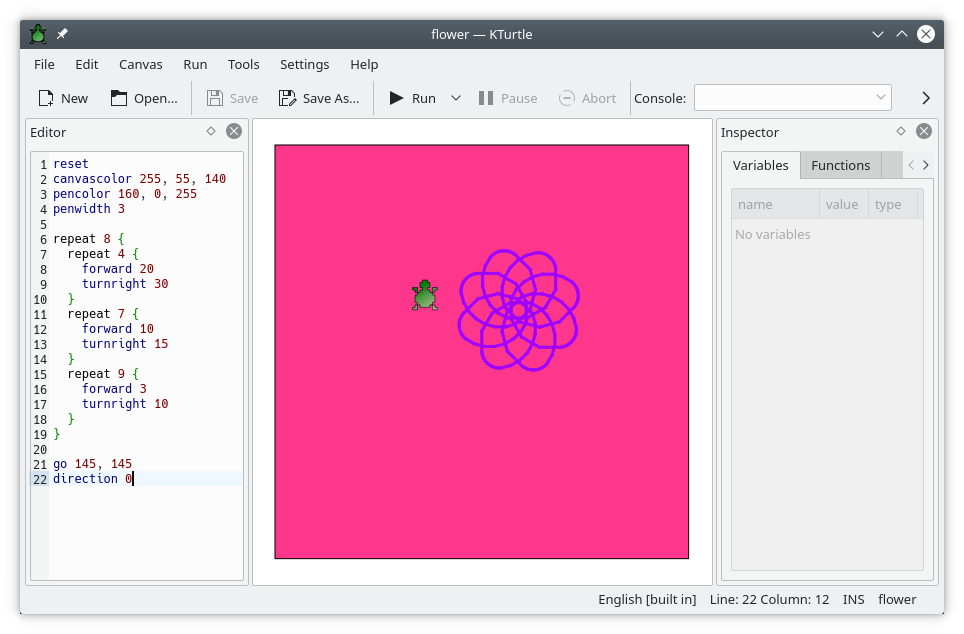
If you want to give the child some background in how software works, Logo was very popular with kids at the school.
Logo is this little turtle that you give orders, similar to imperative programming language used in most softwares.
Change colour to green, walk forward 50 steps.
And the turtle would draw a green line on the screen.
There are plenty of options for software that provides that, here is an option https://apps.kde.org/kturtle/
And, of course, try to break these in multiple days, building a PC, installing OS and playing with programs can be overwhelming for some kids.
yeah logo is how I get into computers at that age, it’s still a great choice imo
Recommendation
I think the Raspberry Pi has a suit of prepackaged games and things like that, which you could use. Give your Raspberry Pi a good casing, and it will be indestructible.
Tangent
I would still warn them from the dangers of the modern digital world, in the sense of surveillance and censorship of social media, what is posted on the internet stays there forever, how proprietary software tricks the user and is oftentimes malware (Gmail, Windows, etc.) and things like that.
I mean, computers are cool, but the mainstream computer world is filled with so much nonsense or outright malice. And if I had a child, I wouldn’t want them to be harmed by that. Like, I don’t want my child to be indoctrinated into the sexist manosphere, just because the Instagram Algo said so and will do literally anything to keep them on the platform as long as possible. Software and computers are cool, but there’s so much vile and genuinely dangerous stuff even for adults. For a child it must be hard to navigate. If you say, for example, that Apple devices literally scan every single picture on your device and send the result to Apple, you’ll sound like a crazed tin foil hat lunatic. But this is quite literally what happens with MediaAnalysisD. In the USA, a young family got harassed by police because they sent a picture of their sick child to their doctor via Gmail.
Edit: typo.
To me the main thing is to relate to a computer as a programmable device, not just a shiny box with pictures and videos. To that end, it might be more effective to have the computer just be in command line mode rather than it just being a conduit to youtube.
I started on an apple II at a friend’s house. BASIC was built right in to the command line. Our family ended up with a TRS-80 compatible which also had BASIC. Back then everything you needed to know was in the TRS-80 basic manual. I spent hours and hours making games on it.
Perhaps something like LOGO? Some simple command line environment where the knowledge required is small, and there are easily reachable payoffs for making loops and so forth.
Reminds me of this post, I wanted to do something like this when I have a kid, but it turns out not all children are the same, who would have thought, and mine isn’t interested in how things work.
https://changelog.complete.org/archives/1448-introducing-the-command-line-at-3-years
@RheumatoidArthritis@mander.xyz that’s lovely. Is that yours ?🤓🤓
@pr06lefs@lemmy.ml