I’m new to self-hosting. All I did so far was install Ubuntu Server, enable SSH and tried setting up DuckDNS, which I could not set up automatic update of my IP following the documentation, neither updating manually through the website, which even though seems to be changed, when I ssh the domain, I get the initial IP
Anyone using DuckDNS? Is it working properly for you guys? Did I just mess something up?
What other DDNS providers would you recommend me?
You must log in or register to comment.
I’ve been using desec.io since it’s european, non profit and privacy oriented. Bring your own domain though. Works well, although my caddy plugin has problems getting certs sometimes. My pangolin instance never has any issues getting certs so might be caddy desec plugin specific.
Anything that supports bind’s built-in nsupdate.
I have dyndns. I don’t recommend them, unless a coworker just gave you their lifetime pro account for free.
Thanks Roody, wherever you are!
I already used desec.io for my domains back when I had static IP blocks at home so I just used the dyndns api with ddclient to update them automatically for my dynamic IP.
I put the curl command to update my duckdns IP in cron about 13 years ago, and have never needed to touch it once.
It’s just worked for me
Oh wow, me too. And I just checked and it’s still there, still works. The token is 10 years old.
This. Never had an issue.
I did this too, and my log always gets an OK. But the IP never changes.
The ip shouldnt change unless the server is down for a period of time and the ip is dynamic.
If it is returning OK then it sounds like duckdns is working as intended
For dynamic updating of dns, don’t use ddclient or cron scripts on the server. Instead use inadyn.
Ddclient is more or less just dead/maintenance mode.
also using cron scripts kinda sucks and is ugly.
just use inadyn and spare yourself headache.
You’d basically just add something like this to the inadyn.conf file
provider duckdns.org { username = YOUR_TOKEN password = noPasswordForDuckdns hostname = YOUR_DOMAIN.duckdns.org }As of October 2025, this project has been archived and is no longer maintained.
After many years of development and community contributions, maintenance on this repository has ended. The source code remains available for reference and for anyone who wishes to continue development in their own fork.
— Joachim Wiberg (troglobit)
https://github.com/troglobit/inadyn?tab=readme-ov-file#project-archived
…well shit.
edit: that being said, duckDNS has not changed in a LONG time, so Inadyn will work for duckdns fine. May need other solutions with evolving platforms like No-IP or Cloudflare as this begins to age out if no one forks it.
You could be behind CGNAT - I’m not sure the best way to tell but it could be the reason.
I would also highly recommend buying a cheap domain to use - it would be the price of a coffee per year but makes life so much easier and you don’t have to depend on duckdns. You can buy through cloudflare, porkbun or many other options which you can search for a good DDNS service to update them.
I read briefly about CGNAT, a d I think this is the case, checking the IP of my services with external services I get an IP different from the one I see in my machine. Tested more than one DDNS service and all updated my IP with the same “wrong” value.
How do I solve this? Should I contact my ISP and hope they can provide a solution?
CGNAT does have a designated range by spec. 100.64.0.0/10, which covers addresses from 100.64.0.0 to 100.127.255.255. Technically they could be using any other private address space but it would be very uncommon in a modern ISP.
I had used duckdns for a while back in the day. Always worked great.
These days I have a domain at namecheap which provides a DynDNS feature as well so I’m using that.
I used to just use a script with
cronto update Cloudflare DNS records but these days I don’t screw around with exposing anything to the public internet directly, I just use Tailscale.Is there a difference between using Tailscale and Wireguard? I already have a Wireguard setup and want to know what benefits it has over Wireguard.
They’re similar but mainly Tailscale arranges WireGuard tunnels between peers. There are tons of useful features around that functionality like being able to route specific traffic through specific hosts (“nodes” using “app connectors”); it’s even better at finding a way out of hostile networks using relays.
Just as an example I typically use my VPS as an “exit node” so that all my traffic routes through it (which does a ton of tunnel hopping through commercial VPNs) while my wife isn’t into that at all, but both of us have Tailscale on our devices so when either of us accessing Home Assistant it’s routed directly to the host hosting it.
Also MagicDNS is great.
I got my domain through namecheap. So, I just use them, they have a dynamicdns implementation. I setup a namecheapddns docker container that auto updates mine.
Yep same DDClient is super simple to setup with name cheap. Followed ip address changes with very little if any down time. I’ve never noticed between ip changes.
Same! Except I use windows and they have a small app that you can install and run in the background which will update the IP if needed.
I also used duckdns for years before moving to this and I never had any issues using that either. It was the same thing, small app that ran on your machine and you needed the token and it just worked.
I used duckdns for years without any issues at all. Only reason I switched is because I’m using Pangolin and tunneling instead of exposing my IP directly.
I have been using duckdns for a few years without issues. It should be simple enough , just set up a cron job with your details as listed on their site where you configure it. This keeps your dns entry up to date.
NoIP works great for me so far!
I use ddclient on my vps
DuckDNS had been unreliable when I used it, but it’s been a while. I swapped over to desec.io but their signups aren’t always open. Can highly recommend them though, and they offer many paths to update the IP, including DynDNS(2) protocol or just ddclient.
Also works with certbot for Let’s encrypt certificates using dns challenge.
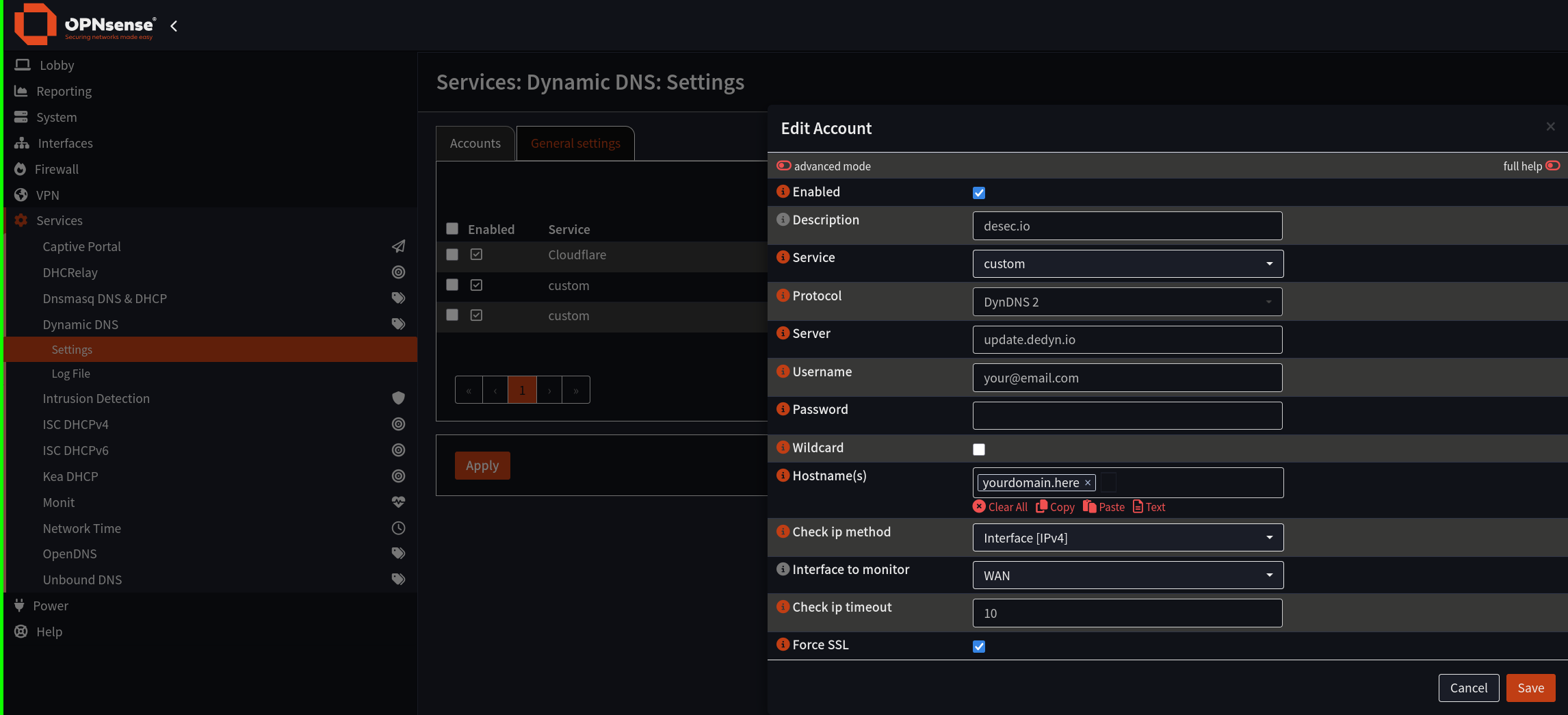
Same. I have a router with OPNsense. In the “Dynamic DNS” section I create a “Custom” service with the DynDNS2 protocol. I type in
update.dedyn.ioas the server address. You need to also get an api key from the desec.io web panel that you input into the username and password fields.Now everytime the router’s WAN ip changes it automatically edits the DNS zone. So instead of going “your server -> DDNS provider -> DNS CNAME record” it’s just “your server -> DNS A record”
I also have a separate token for my web proxy (traefik) so that it can edit the DNS records to get let’s encrypt certificates through dns challenge as you describe.
As for the desec signups in my case one DNS zone was no problem, but for a second one I needed to e-mail them:
Hello, would it be possible for my newly created account to get one more domain on the account please? I have two personal domains and it would be great if I could keep them both under deSEC
Hi [me], Sure! The limit is mostly there to remind users to enable DNSSEC, but it looks like you’re already doing that (at your old provider).
They asked me to (voluntarily) donate, which I did too.